
Add Reflections to Custom Shaders
Adding reflections to custom shaders is easy through the additional ShaderGraph sub-graphs included with the asset and automatically set parameters.
These are the common properties that the asset uses:
Texture2D _2DReflectionTex: The reflection’s output. Mandatory
Texture2D _2DReflectionDynTex: Used to support Local Sprite Reflections. Optional.
Texture2D _2DReflectionParallaxTex: Used to support Parallax Reflections. Optional.
Vector4 _SurfaceXY: Used to correctly project the reflection texture. Mandatory.
The included subgraphs are:
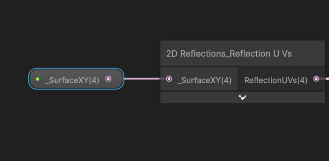
2DReflections_ReflectionUVs
This node uses a Vector4 input parameter named _SurfaceXY (the name is mandatory, as it is set automatically by the 2DReflectionCaster component) and outputs ready to use UVs for the reflection texture. These UVs include the actual UVs of the reflection (XY) and modified Screen UVs (ZW).
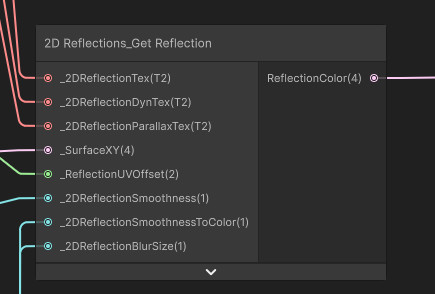
2DReflections_GetReflection
This node allows you to easily recreate the functionality of the included shaders. It takes the three reflection passes: base pass or _2DReflectionTex, local sprite reflections pass or _2DReflectionDynTex and parallax pass or _2DReflectionParallaxTex; the _SurfaceXY vector, an optional Reflection UV offset (to simulate waves or distortion for example), as well as the needed parameters for smoothness, blur and blur size.
All the inputs from the node have the names expected by the custom shader GUI included with the asset, if you wish to use it.
However, to use this node, you will also need to add a couple keywords to your shader:
Boolean Keyword BLUR_REFLECTIONS_ON
Boolean Keyword PARALLAX_REFLECTIONS_ON
These two keywords are used by the node to determine whether to perform the blur shader operations, the parallax ones, or both.
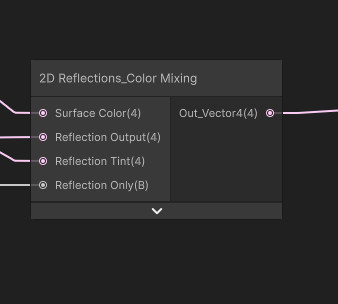
2DReflections_ColorMixing
This node allows you to mix the reflection color with that of the reflective surface’s sprite. It takes as input the surface’s color, the reflection’s one (this should ideally be the output of the GetReflection node), an optional Reflection Tint and an additional boolean parameter that determines whether the reflection’s background (any areas without reflected objects) should be removed.
These three nodes are used in all the included shaders, meaning that with them you can recreate all their effects and features on your own with minimal effort.