
2D Reflection Renderer
The 2D Reflection Renderer is the script responsible for rendering the real-time reflections and all of its features.
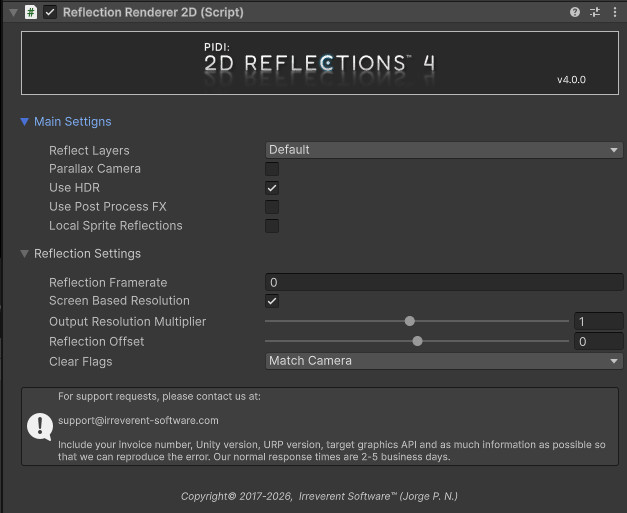
Main Settings Tab
The Main Settings tab contains the basic settings for the reflection as well as several optional features.
Reflect Layers defines which layers are rendered by the main Reflection pass. This initial reflection is a Flipped view of what the camera sees based on the component’s reflection line and normal.
Parallax Camera allows you to set up the reflection to work with a set of stacked cameras, a common setup when trying to add a Parallax effect to a 2D scene.
Use HDR. Ensures that the Reflection texture is set for HDR support. This is necessary in most cases to reflect bloom and similar effects correctly.
Use Post Process FX. It is heavily recommended to leave this setting off. It allows for the reflection to interact with URP’s Post Process Volumes. However, most Post Process FX are not designed to be reflected and will produce strange and / or incorrect results. On most cases, it is also completely unnecessary.
Local Sprite Reflections. Performs an additional reflection pass in which all Sprites and objects with the Local Sprite Reflection component attached will be rendered, before being mixed with the original reflection. These Local Sprite Reflections have their own, independent pivot points which makes them perfect for Top-Down games and other situations where the reflected object must move arbitrarily over the reflective surface. They have minimal performance cost. For an example on how to use these features, open the included Top-Down Reflections demo scenes.
Reflection Settings Tab
Reflection Framerate. An optional value that can limit the update frequency of the reflection. In most cases you want to leave it as zero (which will perform one update each frame)
Screen Based Resolution. If enabled, the resolution of the reflection will be a given factor of the actual screen’s resolution. This is the best setup in most cases as it ensures that the reflection has as much or as little detail as needed depending on the player’s display.
Reflection Offset. Applies an offset on the Y axis to the reflection (does not affect Local Sprite Reflections).
Clear Flags. They can be set to either match the Camera’s Clear flags or to use a custom color. If the given color has an alpha of zero this allows for additional effects (such as removing the sprite around the reflections) to be used.
Advanced settings, such as those for Parallax Reflections and the Local Sprite Reflections pass will be covered in their respective top